Every follow-up, every handoff — tracked in one place
Table, Kanban, or Calendar — pick the view that fits how you work. Every task links to the contact, review, or conversation that created it. Nothing falls through the cracks because nothing lives in your head anymore.
See your work the way you think
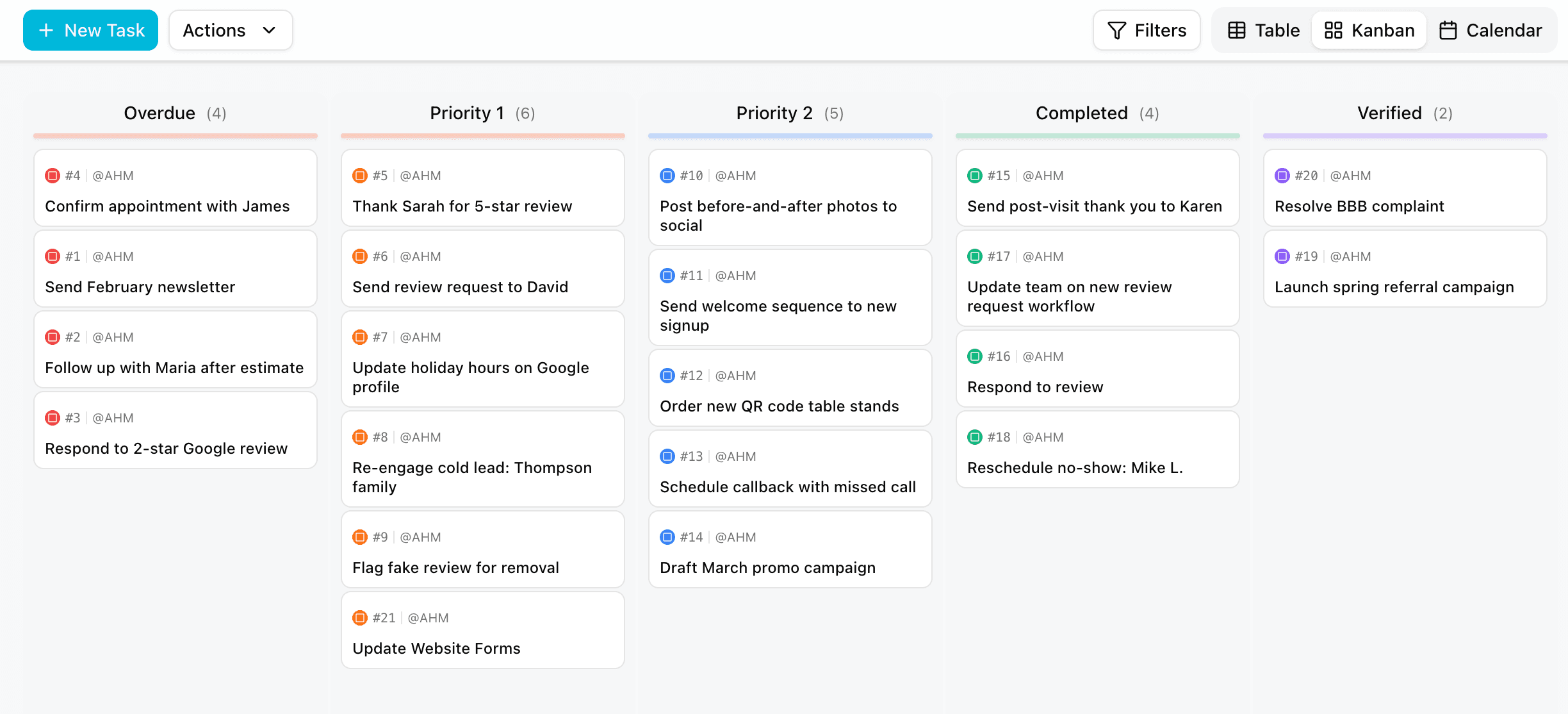
Some people need rows and columns. Others need cards they can drag. Your front desk wants a calendar. SurfBloom gives you all three — Table, Kanban, and Calendar — and they all show the same tasks. Switch between them without losing anything. Kanban columns match your statuses: Overdue, Priority 1, Priority 2, Completed, Verified. Drag a card from Priority 1 to Completed and it updates everywhere instantly. Table view gives you sortable columns, bulk actions, and the density you need when you're managing dozens of tasks at once. Calendar shows what's due today, what's coming, and what slipped — with unscheduled tasks in a sidebar so nothing hides.
Respond to 2-star review
Assignee
Alex H.
Due
Today, 5:00 PM
Sarah: Did we call this person back?
Alex: Yes, she's rescheduled for Thursday. Closing this out.
Every task knows why it exists — and your team can talk about it
A task that says "Follow up" means nothing without context. SurfBloom tasks link directly to the contact, review, or conversation that created them. Open any task and you see exactly who it's about, what they said, and what happened last.
Color-coded icons tell you at a glance what type of work it is — a location task for the whole business, a contact task tied to a specific person, or a review task triggered by feedback.
Every task has a built-in message thread where your team discusses that specific task — not buried in a group chat, not lost in email, not shouted across the office.
"Did we call this person back?" "Yes, she's rescheduled for Thursday." Right there, attached to the task, visible to everyone who needs it. Add categories, assignees, due dates, checklists, and related tasks. All the context lives in one place so nobody asks "wait, which patient was this for?" ever again.

PerfectVisibility
No more guessing who called back. No more lost sticky notes. Just a crystal-clear view of exactly what needs to happen next.
Tasks that assign themselves
The real power is that you don't create most of these tasks manually. A workflow fires when a 2-star review lands — it creates a "Respond to negative review" task, assigns it to the manager, sets priority to 1, and links the review.
A new contact comes in with no appointment — workflow creates a "Schedule consultation" task with a 24-hour deadline.
Your team opens the board in the morning, and everything they need to do is already there, already prioritized, already linked to the right person. They just work the board.
Trigger
2-Star Review Lands
Action
Create Task
Respond to review